Pages

Showing posts with label UseFul Softwares. Show all posts

Thursday, 16 June 2016

https://goo.gl/fDO9ml dupeGuru

dupeGuru

dupeGuru is a tool to find duplicate files on your computer. It can scan either filenames or contents. The filename scan features a fuzzy matching algorithm that can find duplicate filenames even when they are not exactly the same. dupeGuru runs on Windows, Mac OS X and Linux.
dupeGuru is efficient. Find your duplicate files in minutes, thanks to its quick fuzzy matching algorithm. dupeGuru not only finds filenames that are the same, but it also finds similar filenames.
dupeGuru is customizable. You can tweak its matching engine to find exactly the kind of duplicates you want to find. ThePreference page of the help file lists all the scanning engine settings you can change.
dupeGuru is safe. Its engine has been especially designed with safety in mind. Its reference directory system as well as its grouping system prevent you from deleting files you didn't mean to delete.
Do whatever you want with your duplicates. Not only can you delete duplicates files dupeGuru finds, but you can also move or copy them elsewhere. There are also multiple ways to filter and sort your results to easily weed out false duplicates (for low threshold scans).
Supported languages: English, French, German, Chinese (Simplified), Czech, Italian, Armenian, Russian, Ukrainian, Brazilian, Vietnamese.
https://goo.gl/fDO9ml

http://goo.gl/WxC1cf WinDirStat

WinDirStat 
WinDirStat is an open-source disk usage analyzer, designed to help you identify how much disk space you are using and what you are using it on. It will analyze any drive or directory that you choose and then provide you with a visual display of all your files. WinDirStat assigns each file type a color depending on how much space it is taking up, allowing you at a glance to see which file type is taking up the most space. So for example, the files taking up most of the room on your drive or directory are blue by default.
The advantage of WinDirStat is that once you know where you are using the most disk space, you can then decide where you want to slim down and where space can be saved. Thanks to the numerous features in WinDirStat it is easy to manage your files, this includes a setting to automatically delete files without the use of the Recycle Bin. With its intuitive interface, WinDirStat is really easy to use and you won't have any problems getting to grips with any of its functions.
You have the choice of viewing your files in three different ways:
  • The directory list, which resembles the tree view of the Windows Explorer but is sorted by file/subtree size.
  • The treemap, which shows the whole contents of the directory tree straight away.
  • The extension list, which serves as a legend and shows statistics about the file types.


http://goo.gl/WxC1cf

http://goo.gl/MVWQ2C Disk Inventory X

Disk Inventory X

Disk Inventory X is a disk usage utility for Mac OS X 10.3 (and later). It shows the sizes of files and folders in a special graphical way called "treemaps". 

If you've ever wondered where all your disk space has gone, Disk Inventory X will help you to answer this question. 

For a quick start please read the readme file on the disk image
main_small1
http://goo.gl/MVWQ2C

http:/goo.gl/3T5C1a SpaceSniffer

SpaceSniffer

I must admit, in past years I looked for long time to a quick and easy way to analyze my disks space occupation. Found many products, some free some commercial but I never accustomed to anyone of them. It's only a matter of taste but... since my work is not to analyze disk space all the day, for this annoying task I wanted a software that does not need to be re-learned every time I run it. Everything should be directly accessible. In my opinion, if I wonder what is the meaning of a button, then that button should be removed. This is the need that urged me to program SpaceSniffer.
SpaceSniffer tries to be intuitive. Moreover it has some graphical effects. Maybe people think they're useless. I think they help to understand what's happening. The zoom in/out effect for instance helps me to understand where i'm going. The blinking effect helps me understand what has been just scanned or what has changed under my eyes. I found them useful for me, and hope they can be useful for others.
Obviously, it's a matter of taste. Sure there are people that cannot live without complex statistical functions and so. Maybe SpaceSniffer is too simplistic for them. But, if you don't have much time to recover free disk space you'll like a minimal interface.
Please don't misunderstand: minimal interface does not mean simple program. The smart caching engine of SpaceSniffer is designed to permit navigation even during the scan process. More views can be opened on the same disk with different filters and different navigation paths, and a single scan will be performed. If the file system changes then SpaceSniffer reflects those changes even during a scan operation. In my opinion, the complexity of an application must not be visible to the user. Everything should appear simple and obvious. This is the target in the develop of SpaceSniffer.
So, there is plenty of disk analysis tools over the internet, each one has his own features and his own dignity. I hope that SpaceSniffer can be accepted for what it is: simple way to free space with minimum time expense.

In few words:
  • Fast and easy to use
  • Supports drag and drop
  • Export module lets you produce customizable textual reports
  • Intuitive structure layout, multiple views for different media
  • Zoomable elements, navigate like a web browser
  • The Windows folders and file popup menu is accessible by right mouse click
  • It's possible to restrict the view content by typing simple yet powerful filtering criteria
  • Lets you temporary tag files with four different colors and perform filtering on them
  • Different views of the same media can show differently filtered elements
  • Customizable in geometry, colors, behaviors
  • You can navigate even during the scan
  • Smart cached scanning engine, multiple views, single scan
  • You can refine a zoomed area by a secondary scan process, even with main scan active
  • Reacts to file system events, keeps always in synch, warns you by blinking elements
  • Can scan NTFS Alternate Data Streams
  • It doesn't clutter your registry, only a plain XML configuration file
  • It's portable, no installation required, just put the executable somewhere and let's go
  • It's freeWare (donations are welcome)
http:/goo.gl/3T5C1a

Thursday, 19 May 2016

http://goo.gl/TUzAXR Multi Commander

Multi Commander
advanced file manager
Multi Commander is an advanced file manager that can be used in dual or single panel mode. In addition to the standard file management features, the program offers a vast array of advanced options that allow you to manage, filter and manipulate your files in many different ways.
The program takes a little getting used to, most commands are available from buttons and menus rather than right click options, and some configuration options are available from a tab, others from separate dialogs.
Once you get over these little oddities, Multi Commander has much to offer. It is highly customizable, you can create your own command buttons, choose from different interface layouts, create user defined commands, customize menu options and much more.
Some of the more advanced features include file renaming, image conversion, EXIF and meta tag extraction, file date adjustments, one-click file filtering, text conversions, folder comparison, and lots of other things.
http://goo.gl/TUzAXR

Thursday, 21 April 2016

https://goo.gl/yrjP4m BrowserAddonsView


BrowserAddonsView

view installed browser addons

  BrowserAddonsView displays the details of all web browser addons/plugins that are currently installed on your computer. The program can detect the addons of most popular Web browsers, including Chrome, Firefox, and Internet Explorer. Along with the name of the addons, the program displays the version number, description, status and other details. 

https://goo.gl/yrjP4m

Thursday, 17 March 2016

http://goo.gl/MS47rd PaperPlane Launch your desktop like an iPad

PaperPlane
Launch your desktop like an iPad
PaperPlane is a smart application launcher that can make your Windows desktop look and feel like the desktop on an iPad or Mac.
It neatly arranges your application and document icons in a full screen, multi-page grid. You can add shortcuts for applications, folders, documents, system commands and websites, and also group multiple folders into a submenu.
To bring up the PaperPlane launcher, simply double-click on any empty space or your desktop. You can also use a keyboard hotkey or touch the lower left corner of your screen to bring up the launcher.
Other features include support for multiple monitors, integrated backup and restore, animation effects and a customizable layout and look.
http://goo.gl/MS47rd

Thursday, 10 March 2016

https://goo.gl/WcEEG4 The Great Suspender

The Great Suspender

Automatically suspends unused tabs to free up system resources
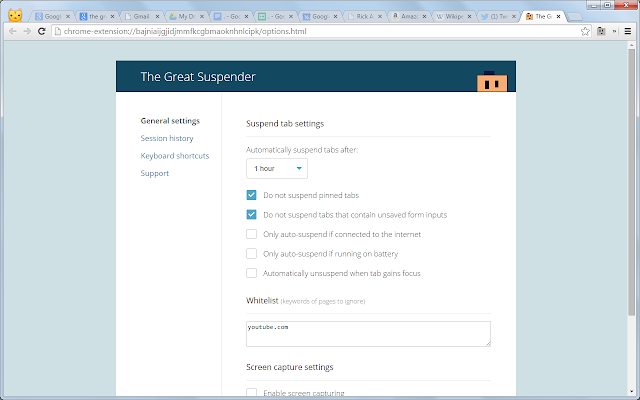
The Great Suspender is a lightweight chrome extension to help reduce chrome's memory footprint for users that like to have too many tabs open at the same time. This extension will automagically unload each tab while retaining its favicon and title text. A tab can be restored by clicking anywhere on the page when it is needed. This reduces the number of dom elements on the page and ensures no memory leaks or excessive javascripts are running.


16/09/2015: New version 6.21 released.
Bug fixes: Tabs no longer suspend with wrong url. Fixed 'suspend other tabs' button
New features: Dark theme for night crawlers. Improved whitelist with regex support. Suspend actions can now be performed on groups of highlighted tabs.
Please report any issues here: https://github.com/deanoemcke/thegreatsuspender/issues
--------------------
Unload, park, suspend tabs to reduce memory footprint of chrome. 
Tabs can auto-suspend after a configurable period of time or be suspended manually. Tabs can be whitelisted to avoid automatic suspension. Suspended tabs are retained after closing and reopening browser, preventing many tabs from all reloading after a restart. Very simple, intuitive interface.
https://goo.gl/WcEEG4

Thursday, 25 February 2016

http://goo.gl/0ObKk AllDup

AllDup

AllDup

Find and remove duplicate files

AllDup is a freeware tool for searching and removing file duplicates on your computer. The fast search algorithm find duplicates of any file type, e.g., text, pictures, music or movies. 

The powerful search engine enables you to find duplicates with a combination of the following criteria: File Name, File Extension, File Size, File Content, File Dates, File Attributes and Hard Links

AllDup Features

  • Search for duplicates of digital photo files
  • Detailed log file about all actions
  • Find duplicates with a combination of the following criteria: file content, file name, file extension, file dates and file attributes!
  • List non-duplicate files
  • Entire folders or individual files can be excluded from the search by masks or size conditions
  • Search for hard links
  • Ignore the ID3 tags of MP3 files
  • Fast search algorithm
  • Search is performed in multiple specified folders, drives, media storages, CD/DVDs...
  • The built-in file viewer allows you to preview many different file formats and analyze the content of the file before deciding what to do with it
  • Create shortcuts or hardlinks to the last original file
  • Export the search result to TXT or CSV file
  • Search through an unlimited number of files and folders
  • The unnecessary duplicates can be deleted permanently or copied/moved to a folder of your choice
  • For your safety all files that have to be deleted can be moved to the Recycle Bin or a separate backup folder
  • Search for duplicates of music and video files
  • Save and restore the search result for continue working later
  • Convenient search result list
  • Many flexible options helps you to select unnecessary duplicates automatically
  • Search for duplicates of executable and any other files

What AllDup can do for you:

  • Find, remove, delete, copy and move duplicate files!
  • Remove duplicate files faster and safer than with any other duplicate file finder!
  • Find and remove duplicate files!
  • Find and hardlink duplicate files!
  • Remove duplicate files - Easily and Anywhere!
  • Find and remove duplicate files from your computer, notebook, network drives, flash drives, memory drives!
  • No more file clones or file duplicates!
  • AllDup is a powerful tool to search for file duplicates on your computer!
  • AllDup helps you to find, view and remove files that have duplicate content, regardless of name!
  • Find and delete hard links
  • Finding out whether a file has hard links!
  • Find duplicate MP3 files with different ID3 Tags!
  • Find and remove duplicate files of ANY type!
  • Free up used hard disk space on your PC!
  • Find and delete duplicate files!
  • It can be especially useful if you have large Music, Pictures, Downloads or Documents folders!
  • Remove duplicate files - as you want!
  • Delete duplicate music files!
  • Remove duplicate photos and images!
  • Clear your computer, music or photo collection from duplicate files!
http://goo.gl/0ObKk

Thursday, 18 February 2016

https://goo.gl/OMSWC9 Automatic Screenshotter

Automatic Screenshotter

Take Screenshots At Regular IntervalsAutomatic Screenshotter is a screen capture utility for taking screenshots at regular intervals. The program runs in your system tray and takes regular screenshots of your desk or the active window every few minutesYou can customize the capture interval and also create application rules that let you skip captures when certain applications are open or only capture screenshots of specific applications.In addition, you can set capture rules that automatically suspend captures if your computer is idle, if you are playing a full-screen game or if your screensaver is running.Other features include customizable capture intervals and file name options, automatic deletion of old captures, support for multiple monitors, and more.
https://goo.gl/OMSWC9
http://goo.gl/OMSWC9

http://goo.gl/wobGp5 PDF Combiner

PDF Combiner

Merge Multiple PDF Files Into OnePDF Combiner allows you to easily and quickly merge several files PDF into one.You can simply drag and drop the documents you want to merge onto the application, arrange the order in which you want them to merge, and click a button to combine them into a single PDF document.You also have the option to specify a page range for each document, which can come in handy if you only want to merge selected pages from a PDF file and not the entire document.
http://goo.gl/wobGp5

Thursday, 31 December 2015

https://goo.gl/psNDDF Windows 10


The best Windows yet is here.
Get Windows 10


It’s the Windows you know, only better
Familiar and better than ever
Windows 10 is familiar and easy to use, with lots of similarities to Windows 7 including the Start menu. It starts up and resumes fast, has more built-in security to help keep you safe, and is designed to work with software and hardware you already have.
This combines the strengths of Windows 8 with Windows 7.
Windows Insider
Description: Laptop and phone with Windows 10 Start Menu
Millions of people are already using Windows 10
The Windows Insider Programme is a global community of fans who love Windows and want to help make it better. Insiders see the operating system in its earliest stages, and play a role in shaping it. Their feedback has contributed to the best Windows ever.
Learn more about being a part of the Windows Insider community.
It’s how doing gets done


Make the web work the way you do
Microsoft Edge lets you move quickly from browsing to doing. Write1 or type notes directly on web pages and share them with others, read online articles free of distraction and save your favourite reads for convenient access later.
Multi-doing helps you get to “done” faster
Get to done faster by better managing your desktop. Snap up to four things on one screen at the same time and create virtual desktops whenever you need more space or want to group things by project, like Office apps for work and games for play.
This Windows will definitely blow the other Windows versions out of the water.
Windows Insider
Description: https://c.s-microsoft.com/en-in/CMSImages/icon-ChevronRightSmall.png?version=63907604-072d-2588-d04f-2afe81c72618
Description: Laptop with the Windows Store on the screen
The new Windows Store is the one place for all your favourites
Introducing the new Windows Store, a unified shopping experience across every Windows 10 device. Browse the store on your PC, tablet, or phone and easily download great free and paid digital content including apps, games, music, films and TV programmes.2

Xbox is coming to Windows
The biggest Xbox franchises and the best of Xbox Live are coming to Windows 10. Start recording gameplay in seconds, compete against console players and stream games from your Xbox One to any Windows 10 PC in your home.3
Description: Xbox controller and all-in-one with Xbox on the screen
Great built-in apps that work across your devices
Description: Apps tile for Maps
Description: Apps tile for Photos
Description: Apps tile for Mail
Description: Apps tile for Music
Description: Apps tile for Films & TV
Description: Apps tile for OneDrive
Description: An all-in-one, 2-in-1 and Windows phone all showing the same image
The best screen is always the one that you’re on
Windows 10 enables your apps to look and work great in all modes, on all touch PCs and tablets.5
Description: A Windows phone connected to a monitor
Introducing the first smartphone with PC-like power
Connect to a monitor, mouse and keyboard to use your Windows 10 phone like a PC for getting things done or project to a larger-screen for big-time entertainment.6
Note: Continuum for phones will be available on select new premium phones coming soon.
It’s the most personal Windows yet
Interact with your device however you want
Touch, type, write or speak: the choice is yours so you can use whatever works best for what you’re doing. 7
Description: https://c.s-microsoft.com/en-in/CMSImages/touch.png?version=82b70b92-acac-2594-cd2e-4ca3c8697c9f
Touch
Do things like write on a web page, swipe through your photos and snap apps into place.
Description: https://c.s-microsoft.com/en-in/CMSImages/type.png?version=5ac99ba3-98e7-46ce-f57e-a64f4af9057b
Type
When you need to get more done, use your keyboard or the touch keyboard on devices with touch.
Description: https://c.s-microsoft.com/en-in/CMSImages/stylus.png?version=f17116ca-de43-74bd-7d60-f9cc0d330a5c
Write
Use a pen to draw naturally, or add notes to files, sign documents or play around with art apps.
Description: https://c.s-microsoft.com/en-in/CMSImages/voice.png?version=c5b1129a-73d0-c940-b96f-ccc8ca3b8426
Speak
Chat with friends and family on Skype.

https://goo.gl/psNDDF

Thursday, 17 December 2015

https://goo.gl/gMfUOL WiseStamp - Email Signatures for Gmail

WiseStamp - Email Signatures for Gmail

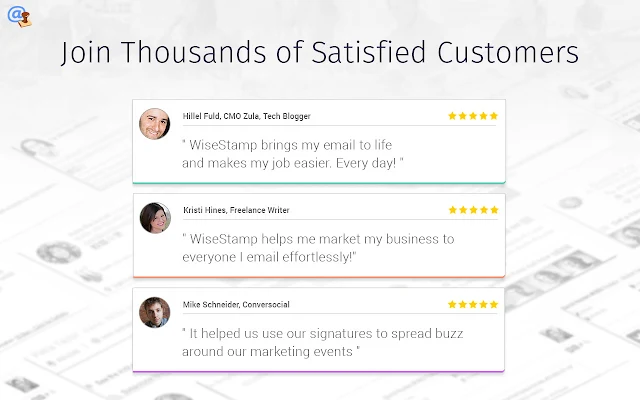
Empower Gmail, Google Apps Mail, Yahoo Mail with dynamic email signatures. Add Facebook, Twitter, Linkedin, Pinterest & more.
WiseStamp enables you to share your social profiles and promote information you care about in every email you send.

With WiseStamp you can easily:
✓ Link to your Profiles - Facebook, Google+, Twitter, Linkedin, Skype, Gtalk ...
✓ Promote your latest G+, Etsy, Pinterest eBay item, Blog post ...
✓ Share your latest Twitter tweet, Funny Quotes, Green Footers, Legal disclaimers
✓ Add your Company logo, use Multiple signatures and much more....

***************

Paid version - Is 100% AD FREE!

Free basic version:
May be supported by Ads shopping enhancements and anonymous click-stream data. 

Want an Ad free version?
You can disable all ads and anonymous click-stream data by upgrading to our paid version.  

Your Privacy is always protected!
Read more:
http://www.wisestamp.com/privacy-policy

***************

"They make your email signature “live” with hooks into your social networking tools. Check it out! " - Scobleizer

"looks like WiseStamp will make quite a few people happy" - Lifehacker

Promote what you care about, bring your email to life - Get WiseStamp now !


WiseStamp Supports:
Gmail & Google Apps email, Inbox by Google, Yahoo Mail, Aol Mail, Outlook .com, Hotmail & Live mail.
Domain mail are supported via - Google Apps for work, Office 365 & Godaddy

Features:
 • Easy setup & configuration interface
 • Personally designed signatures
 • Automatic signature insertion
 • Sync between computers

IM icons:
 Skype, Google Talk, Icq, QQ, MSN, AIM and more..
 

Social Services:
 Amazon, Del.icio.us, DeviantART, Digg, eBay, Facebook Profile & Pages, Flickr,  Google buzz, Linkedin, MySpace, Photobucket, Picasa, Quora, Reddit, Slideshare, Stumbleupon, Tumblr, Twitter, Wordpress, Yahoo, Yelp, Youtube and more..Check it out!
https://goo.gl/gMfUOL

https://goo.gl/HS0KW1 Mail2Cloud for Chrome

Mail2Cloud for Chrome

Email + Gmail | Attachment management, schedule emails, privately share files, use reply timeout and get read receipts and reminders
EVERY EMAIL PRODUCTIVITY POWER FEATURE YOU COULD WANT -- ALL IN THE SAME PLACE!

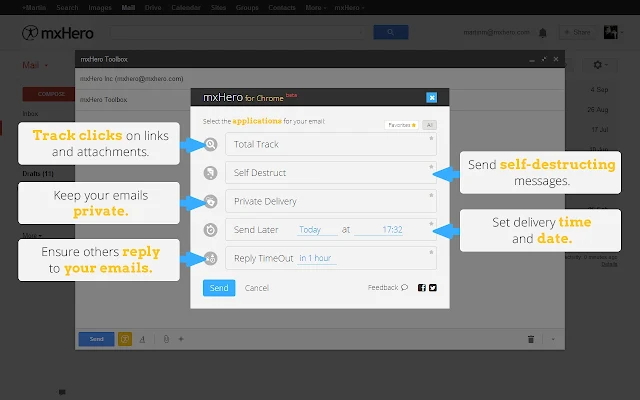
• COMPLETE EMAIL TRACKING! See "read receipts" (when the email is opened), as well as when users click any links you sent or view any files you attach! Note that Mail2Cloud for Chrome tracking is specific to each user, so you'll see exactly who has interacted with what parts of your email!

• EMAIL REMINDERS - Can't deal with an email right now but don't want it to be buried and forgotten? Set an email to automatically reappear in your inbox after a certain amount of time.

• REPLY TIMEOUT - be notified if a particular email doesn't get a response... great for keeping track of important messages that require follow up!

• SELF DESTRUCT - Send sensitive information with greater confidence using our self destructing email feature.

• SCHEDULE EMAILS FOR DELIVERY - Use the Send Later feature to send an email now, but have it delivered at a specific time...

• BONUS: SAVE & SHARE - Our Chrome Extension users get the added bonus of one of our premium Mail2Cloud tools, Save & Share. For cloud storage users, Save & Share will make a PDF copy of any email and save it to a specified folder in cloud storage, along with any attachments, right from Gmail with just a couple clicks.

With mxHero Toolbox you can:

• Get read receipts the moment your email is opened
• Track opening of any attachments with Total Track
• Track clicks on links in your email with Total Track
• Remind yourself of important emails with Remind Me
• Pick the time for your email delivery with Send Later
• Easily identify unanswered emails with Reply Timeout
• Keep group bcc emails private by using Private Delivery
• Protect Your Privacy  send Self Destructing Email

mxHero Toolbox is an App of Choice For

• Entrepreneurs 

• Salespeople

• Job seekers 

• Compulsive emailers

• Productivity geeks


Pricing

• Free for up to 10 uses per month 

• Subscription plans starting at just $2.50 per month


As Featured in:

• Venturebeat

• Lifehacker

• WSJ

• TechCrunch


Testimonials

“A great product soooo easy to use and I can keep track if my emails are read. Never wonder if my friends opened the mail even if they don't respond quickly.”

“This extension is very helpful in providing tools that integrate smoothly with gmail. Thanks!”

“Excellent resource. It is very helpful in organizing my very busy email account. It is very user-friendly and intuitive.”

“Love it. Everyone should have this extension for their gmail. “

“I've tried a couple of extensions that do the same thing. So far mxHero has had the best interface and…seems to work entirely as described.”

“Excellent extension. Love the "send later" & notification that the recipient has opened an attachment.”

mxHero Email Toolbox provides a powerful suite of secure email apps designed increase productivity, increase insight, and drive productivity!

Available in English, Spanish and Portuguese

https://goo.gl/ HS0KW1

Thursday, 10 December 2015

https://goo.gl/lrTGyQ ONLINE TOOLS FOR PDF LOVERS


ONLINE TOOLS FOR PDF LOVERS


Merge PDF

Merge and combine PDFs and put them in whatever order you like. It’s all very easy and fast!

Split PDF

Select a range of pages, separate one page, or convert each page of the document into independent PDF file.

Compress PDF

Decrease your PDF file size, while maintaining the best possible quality. Optimize your PDF files.

WORD to PDF

Convert your documents to a PDF file that is exactly the same as the original DOC or DOCX, with the best possible quality.

POWERPOINT to PDF

Convert your presentations to PDF file that is exactly the same as the original PPT or PPTX, with the best possible quality.

EXCEL to PDF

Convert your tables to PDF file with columns adjusted to the width of the PDF. Portrait or landscape orientation. You choose.

PDF to JPG

Extract all images contained in a PDF or convert each page to a JPG file.

JPG to PDF

Convert your images to PDF. Adjust orientation and margins.
New!

Page numbers

Insert page numbers into PDF documents easily. Choose position, dimensions, format and typography!
New!

Watermark

Choose an image or text to stamp over your PDF. Select position, transparency and typography.
New!

Unlock PDF

Remove the PDF password security, so you can use it as you want.
New!

Rotate PDF

Rotate your PDF as you want. Rotate multiple PDF files at once!
https://goo.gl/lrTGyQ

Thursday, 26 November 2015

http://goo.gl/qJEdL1 Microsoft Snip

Microsoft Snip

Create Annotated Screen Captures With AudioMicrosoft Snip enables you to create screen captures with optional audio narration and annotations.Simply click and drag to capture any window or area of your screen to capture a screenshot. You can then add annotations (pen or highlighter) and even record an audio to narrate your comments.In addition to screen captures, you can also start with a whiteboard for graphical presentations (e.g. simple charts) or snap a picture with your webcam and annotate it.The annotated capture can be saved as image file or MP4 video, if you decide to include an audio narration. You can also share the capture via email or online linking.The ability to add an audio narration to your screen capture can come handy, and Snip makes this very easy to accomplish. However the annotation options are fairly limited and currently only include a pen and a highlighter - we would like to see some shapes arrows and text options.

http://goo.gl/qJEdL1

Related ...