Pages

Showing posts with label Keyboard. Show all posts

Thursday, 22 December 2016

https://goo.gl/t0F5cJ Gboard – the Google Keyboard
Gboard – the Google Keyboard
Cover art
Gboard has everything you love about Google Keyboard – speed and reliability, Glide Typing, voice typing and more – plus Google Search built in. No more app switching; just search and share, right from your keyboard.

Gboard also has emoji search to help you find emojis faster, plus GIF search and multilingual typing to let you switch languages on the go.

Glide Typing – Type faster by sliding your finger from letter to letter

Voice typing – Easily dictate text on the go

Search and share anything from Google:
• Nearby stores and restaurants
• Videos and images
• Weather forecasts
• News articles
• Sports scores
• And anything else you’d search on Google

Emoji Search – Find that emoji, faster

GIFs – Search and share GIFs for the perfect reaction. GIF sharing is only available in apps that have implemented image keyboard support.

Multilingual typing – No more switching between languages manually. Gboard will autocorrect and suggest from any of your enabled languages, without the need to tap on the globe key.

Pro tips:
• Press and hold Enter to choose from hundreds of emoji in any app (Android 4.4+).
• Learns as you type: No need to manually add words to a personal dictionary. Type a word once and you can gesture type it or find it in suggestions next time. Long press a suggestion to remove it from your “learned words” or the keyboard dictionary.
• Sync your learned words across devices to improve suggestions (enable in Gboard Settings→ Dictionary → Sync learned words).
• Gesture cursor control: Slide your finger across the space bar to move the cursor.
• Gesture delete: Slide left from the delete key to quickly delete multiple words.
• Make the number row available all the time (enable in Settings → Preferences → Number Row)
• Symbols hints: Show quick hints on your keys to access symbols with a long press (enable in Gboard Settings → Preferences → Long press for symbols).
• One handed mode: On large screen phones, pin keyboard to the left or the right of the screen by long pressing on Enter and selecting the thumb icon.
• Fast symbols: Gesture from the “?123” key to temporarily switch to the symbols keyboard and insert a symbol.
• Fast capitalisation: Gesture from the SHIFT key to a character to capitalise it.
• Themes: Choose a theme with or without key borders to suit your style.
Over 120 languages supported.
 Gboard – the Google Keyboard- screenshot thumbnail
https://goo.gl/t0F5cJ

Thursday, 21 July 2016

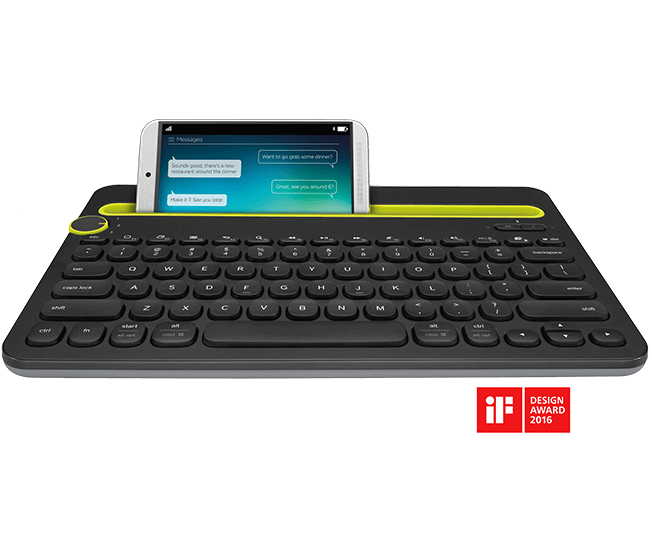
https://goo.gl/joXQ3j Bluetooth Multi-Device Keyboard K480

MULTI-DEVICE KEYBOARD K480

A single keyboard allows you to type on anything! The Bluetooth® Multi-Device Keyboard K480 is a unique keyboard for your Windows, Mac or Chrome computer…that also works with your Android or iOS mobile devices. With a flick of a switch, you can change typing from one device to the next. (Bluetooth wireless device required)

BLUETOOTH MULTI-DEVICE KEYBOARD K480

A wireless desk keyboard for your computer, tablet and smartphone
Rs 2,995.00
The computer keyboard—that also works with your tablet and smartphone
https://goo.gl/joXQ3j

Switch easily between devices

Just turn the Easy-Switch dial to switch typing between three connected Bluetooth wireless devices.


Thursday, 9 June 2016

http://goo.gl/y0Qyg6 TAP Turns Anything You Touch into a Keyboard.

TAP Turns Anything You Touch into a Keyboard.

 Introducing TAP: the revolutionary one-handed wearable which allows you to type by tapping your fingers on ANY surface: a table, a chair, or even your body. Tap is a fast, accurate and eyes-free method of interfacing with any Bluetooth-enabled device, including smartphones, tablets, smart TVs, and computers.
At this moment, traditional keyboards are the dominant technology for data input into computing devices; but that is about to change, as virtual and wearable computing become more mainstream, and surfaces on which to use keyboards disappear. Tap technology enables seamless communications even within immersive AR/VR experiences where keyboard surfaces are not practical, and in wearable computing situations where screens are too small to type on.
Tap Turns Anything You Touch into a Keyboard Introducing TAP: the revolutionary one-handed wearable which allows you to type by tapping your fingers on ANY surface: a table, a chair, or even your body. Tap is a fast, accurate and eyes-free method of interfacing with any Bluetooth-enabled device, including smartphones, tablets, smart TVs, and computers.
The Tap Strap is a soft, flexible smart-textile which embeds an advanced sensing system into a small, comfortable fabric strap.  The Tap Strap can be worn on either hand or on both hands simultaneously for two-handed tapping.  With each tap, the Tap Strap sends a character or command to a device based on which fingers touched the surface.
Users can typically learn to tap in about one hour using the TapGenius App, a mnemonic-based learning system which combines musical and visual tutorials with a fun and engaging game.
Tap also provides a unique solution for blind and low vision users, who can now communicate on mobile devices with the speed and ease of sighted users.  Tapping can be done with fingers touching anything - without the need for on-screen keyboards which can be cumbersome for those who use Voiceover and other text-to-speech features.
"Tap has the potential to become the communication mode of the future, providing fast, accurate interfacing in situations where no physical keyboard exists." said David Schick, Tap's inventor.  "Tap is more discreet and accurate then voice input, and is faster and more precise than gesture-based systems."
"Tap brings an entirely new dimension to how we can interface with the digital world," said Ran Poliakine, Tap's co-founder.  "Tap's fundamental technology is applicable not only to language, but also to music, gaming and control.  It is a new modality that opens up a world of creative possibilities.  We are partnering with creative developers and select OEMs to help us unlock its full potential.  Our goal is to create an ecosystem in which our partners utilize Tap to deliver new and exciting experiences for our users.
Tap is being made available immediately to select beta users - initially in the San Francisco Bay area.  Tap is expected to ship commercially before the end of 2016.
A Tap Development Kit will be available to developers to allow them to harness the capabilities of Tap into a broad range of applications including gaming, AR and VR using the Tap platform.  By supporting an ecosystem of developers, the Tap value to consumers can ultimately extend to other languages, games, music, interactive AR/VR and perhaps to new and creative solutions for the future needs of computing.
A Tap reference design will also be made available to select OEMs for integration into their existing and future product lines including wearables and other innovations.
http://goo.gl/y0Qyg6

Thursday, 19 May 2016

https://goo.gl/GSZfJF Wekey Pocket: the Pocket-sized Wireless Keyboard

Wekey Pocket: the Pocket-sized Wireless Keyboard
Wekey Pocket is the Thinnest and Lightest Keyboard in the World. So small it fits in your Pocket!


https://goo.gl/GSZfJF

Thursday, 3 March 2016

http://goo.gl/7Ppt3d OMOTON® Ultra-Slim Bluetooth Keyboard

OMOTON® Ultra-Slim Bluetooth Keyboard

OMOTON® Ultra-Slim Bluetooth Keyboard for Apple iPad Air (iPad 5), iPad 6, iPad Mini 3/2/1, iPad 4/ 3/ 2, iPhone 6, iPhone 6 plus, Samsung Galaxy Tabs, Galaxy Notes, Google Nexus 9, Nexus 7 and other Bluetooth Enabled Devices, For Apple, White

  • 1. Cable-Free. Bluetooth Connection with your Mobile Devices such as Tablets and mobile phones, Bring you more convenience when you need to type, Operating Distance up to 10 meters.
  • 2. Super Compatibility. Compatible with all iPads, iPhones and all Bluetooth-enabled Tablets, Laptops, and Mobile Phones.
  • 3. Reasonable Layout. QWERTY Layout with Hot keys Customized for all iPads, Including Volume, Music Control, Brightness etc.
  • 4. Long Battery Life. 30-days continuous use and automatic sleep mode allow up to half a year between battery changes.
  • 5. Perfect Size. Just Big Enough for your fingers to enjoy a wonderful typing, and small enough to put it into your suitcase/handbag.
BrandOMOTON
Item Height6 Millimeters
Item Width12 Centimeters
Item Weight159 g
Product Dimensions28.5 x 12 x 0.6 cm
http://goo.gl/7Ppt3d

Thursday, 29 October 2015

http://goo.gl/NzY0vf WIRELESS TOUCH KEYBOARD K400 PLUS

WIRELESS TOUCH KEYBOARD K400 PLUS

HTPC keyboard for PC connected TVs
$ 3999
Experience PC-to-TV entertainment the way you like it—from the comfort of your couch.

Designed for laid-back control

PC-to-TV entertainment shouldn't be hard work. Kick back and navigate your TV-connected computer from the comfort of your couch!

Integrated wireless keyboard with touchpad

Enjoy seamless control of your PC-to-TV entertainment, without the hassle and clutter of a separate keyboard and mouse.Comfortable, quiet keys and a large (3.5-inch) touchpad make navigation effortless.

10-meter (33-foot) wireless range

Watch video, browse the web, chat with friends and more, without annoying delays or dropouts.
  • Responsive, trouble-free connection even in large spaces.
  • Wireless range may vary depending on operating environment and computer setup.

Media-friendly TV keyboard

You are instantly comfortable using the K400 Plus. Layout is designed for relaxed media interaction.
  • Easy-access volume controls and arrow keys.
  • Second left-click button lets you navigate and make selections with two hands.
  • Shortcuts for Windows® and Android™ users.
  • Hot keys work right from the box; no configuration 
  • Plug-and-play setup

    Setting up K400 Plus is a snap. Plug the tiny Unifying receiver into a USB port and start the fun.Use the keyboard receiver to connect up to six Unifying devices to your computer. 
  • 18-month battery life

    You might forget this keyboard needs batteries.
    • Virtually eliminates the hassle of replacing batteries.
    • Use the on/off switch to extend battery life even further.
    • Battery life was independently tested for two-hour sue per day. Actual battery life will vary with use, settings and environmental conditions.
  • Works with multiple operating systems

    Designed for use with Windows® 7, Windows 8, Windows 10 and later, Android™ 5.0 or later, and Chrome OS™.
  • Customizable control

    Use K400 Plus right from the box, or personalize key and touchpad settings with Logitech Options™ software. 
    Download now
  • System Requirements

    OS/Platform Support
    • Windows® 7, Windows 8, Windows 10 or later
    • Android™ 5.0 or later
    • Chrome OS™
    • USB port
  • Dimensions

    • Overall

    • Height: 139.9 mm (5.5 in)
    • Width: 354.3 mm (14.0 in)
    • Depth: 23.5 mm (1.0 in)
    • Weight: 390g (with batteries)

    • Touchpad

    • Height: 76 mm (3.0 in )
    • Width: 47 mm (2.0 in)
  • Warranty Information

    1-Year Limited Hardware Warranty
  • Package Contents

      • Wireless Touch Keyboard
      • Unifying receiver
      • 2 AA batteries (pre-installed)
      • User documentation
  • Part Number

    • Black: PN 920-007119
  • Technical Specifications

    • Connection Type: Logitech Unifying protocol (2.4GHz)
    • Special Keys: Mute, Volume Down, Volume Up
    • Connect / Power: On/Off Switch
    • Battery Details: 2 x AA
    • Battery Life (not rechargeable): Up to 18 months
    • Key life: Up to 5 million keystrokes
    • Typing noise: Within 55 dBA for all keys
    • Wireless range: 33 ft (10 m)
http://goo.gl/NzY0vf

Thursday, 16 July 2015

http://goo.gl/35w9wz Bluetooth Multi-Device Keyboard K480

Bluetooth Multi-Device Keyboard K480

A wireless desk keyboard for your computer, tablet and smartphone
K480 with phone, monitor and tablet

Type-on-anything universal keyboard

A new type of keyboard for your computer—that also works with your smartphone or tablet.*
  • Bluetooth wireless
  • Multi-platform and cross-platform

Switch easily between devices

Just turn the Easy-Switch dial to switch typing between three connectedBluetooth wireless devices.

Windows and Mac. Android and iOS

You’ll find a familiar keyboard layout with all the shortcut keys you use the most.
  • For Windows, Mac or Chrome computers
  • For Android or iOS mobile devices.

Type in comfort

The integrated cradle holds your phone or tablet at just the right angle for you to read while you type.*
* Most phones and tablets up to 10.5mm (0.4 inches) thick and 258mm (10 inches) wide.

ystem Requirements

Bluetooth wireless computers or mobile devices which support external keyboards (HID profile).
  • PC: Windows® 7, Windows® 8 or later
  • Mac: Mac OS X® or later
  • Chrome OS™
  • iPad® or iPhone®: iOS 5 or later
  • Android™ tablet or smartphone: Android 3.2 or later.
Internet connection (for optional software download)
Online K480 Immersion Guide, view here.

Warranty Information

2-Year Limited Hardware Warranty

Package Contents

  • Keyboard
  • 2 AAA batteries (pre-installed)
  • User documentation

Part Number

  • PN 920-006364Black,UK English
  • PN 920-006362Black,Dansk / Norsk / Svenska / Suomalainen
  • PN 920-006365White,UK English
  • PN 920-006363White,Dansk / Norsk / Svenska / Suomalainen

Optional Software

Logitech Options
Logitech Options software lets you customize your device settings.
Logitech Keyboard Plus App (for Android)

Dimensions

Height: 7.68 in (195 mm)
Width: 11.77 in (299 mm)
Depth: 0.79 in (20 mm)
Weight: 820 g (1.81 pounds)

Technical Specifications

  • Available in white and black.
  • Bluetooth range: up to 10 m (30 ft)*
  • Battery life: 2 years**
  • On/Off power switch
  • Battery life indicator light 
http://goo.gl/35w9wz

Thursday, 18 December 2014

http://goo.gl/McmKzo The Qwerkywriter - Typewriter Inspired Mechanical Keyboard

The Qwerkywriter - Typewriter Inspired Mechanical Keyboard

Also visit us at Qwerkytoys to sign up for our newsletter!

Join our Facebook page or follow us on TWITTER!

The Qwerkywriter is an 84 key, USB, Bluetooth enabled, typewriter-inspired mechanical keyboard that simulates a tactile clicky feel of a vintage typewriter. It features custom typewriter-inspired keycaps, an integrated tablet stand, and a detachable USB cable via mini-USB port.

[Quick Facts]

  • The Qwerkywriter you see in the video and picture below is an early hand built proof-of-concept prototype as is subject to change. The final shipping version will be CAD engineered, machine tooled, and factory built.  
  • The Qwerkywriter is a mechanical keyboard with Cherry MX Blue switches (a modern switch that emulates the typewriter clicky feel) and features beautiful chrome accented round keycaps with a vintage typewriter inspired frame. 
  • The Qwerkywriter tablet stand can accommodate a wide range of tablets (up to 5/8 inches thick).  
  • WIN US/ANSI is the default layout. MAC OS layout supported via alternate CMD keys.  International/ISO layout is also supported. 
  • The Qwerkywriter is Bluetooth enabled for wireless connectivity. 
  • Return bar functionality is currently under development.
  • Dimensions: 12.5" x 7.5" x 3.5" approx. Weight 3lb
Disclaimer Please Read:  This product will ship by August 2015.  Final specs may be subject to change.

The Qwerkywriter
The Qwerkywriter

Right Angle View
Right Angle View

Front View
Front View

Angled View
Angled View

Qwerkywriter /r/battlestations

Qwerkywriter via Wired USB to an iMAC

Qwerkywriter with a Macbook via USB

Mac OS CMD Keycap
Mac OS CMD Keycap

Cherry MX mechanical switch with a tactile "clicky" feedback

Cherry MX Compatible Keycaps

Qwerkywriter in Portrait Mode

Return bar functionality currently under development

Bluetooth Wireless Integration

Risks and challenges

Higher than average tooling cost - Initial engineering pass revealed that the unique nature of the Qwerkywriter, especially its typewriter keycap design, will be costly. We will have to strike the right balance of quality and compromises in order for Qwerkywriter to be successful.
Sourcing Components - As a niche Kickstarter project, it will be a challenge to source components at competitive prices. Managing supply chain is no small feat even for big established business. So I have given myself plenty of lead times for negotiating prices and finding the right vendors.
Learn about accountability on Kickstarter
http://goo.gl/McmKzo

Related ...